Showing posts with label few. Show all posts
Showing posts with label few. Show all posts
Saturday, February 28, 2015
iOS7 iphone battery discharges drains too fast few tips
Apple has launched different version of its latest iphone operating system iOS7. iOS 7 do offer a great user experience and enhanced feature to an end user. But along with that it has bring new complaints and problems to Apple in multiple fields. One of them most affected feature are WiFi and battery drainage and most affected iphone user are iphone4s. Although this problem is also seen in new model of iphone5 and 5s.

iPhone 4s user were complaining that their device was working properly with iOS6 and upgrade to iOS 7 has pulled them into problems. I am sharing few tips to deal with these issues.
To Avoid battery issue in iphone you can try following things:
Avoid using continuous WiFi and 3G services : We generally tend to use our WiFi and 3G turned on even when we dont need it. There are so many apps in your iphone that will be continuously do somethings over the network like updating data, sending notification etc. By this you are putting your iphone in continuous working state. Some times it will result in heating up of iphone and thus quick drainage of battery.
Turn off unnecessary apps from doing updated automatically : Whenever you install a app by default for most of them they will be allowed to access internet from your device. By turning some of them off you can actually bring down load on your iphone. Along with that you should not use your location GPS service whenever not required. It is also a big source of battery drainage. Along with these you can also turn off some of the inbuilt feature which work continuously like "Reduce Motion" , "Siri - raise to speak". Use sensible setting like auto-brightness etc.

Its better to Sometimes restart your iphone: is your iphone is getting hot sometimes causing battery drainage: Its always recommended to give some break to your iphone before it does it by itself. Try to put habit to restart your iphone once or twice in a week, it will help in cleaning down some suspended activity/processes which will still use battery other resources of iphone. It will also make your phone work fast.
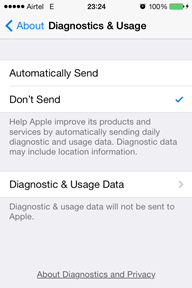
Try to analyze Diagnostic and Usage Data: Go to Settings->General ->About, Diagnostics & Usage, Diagnostic & Usage Data. At this place data regarding processes will be stored. Go through the list and check if there are any system processes with an abnormally large number of entries. Find the name of the troubled process it can be anything like iClound, calander etc. Or you can use third party software from App Store to monitor your process status.
Is this a hardware problem: I must say no.Because these kind of problem are occurring once user update iphone to new version of iOS. A faulty battery will give same response to all software release. Its the OS oprimization that should take care of battery usage among its different process operations. If nothing is working you should restore your old backup and live with it.
Let me know if this helped you.

Friday, February 27, 2015
iphone 5 not turning on Here are few tips you can try !!
Iphone not turning on. This is a common problem reported by several users , meaning user are not able to turn on their device after they have turned it off.
If your are also stuck in similar problem ie iPhone is not responding to turn on, try these troubleshooting steps:

- Dead Battery: This can happen cause your battery has been drained completely, just plug in your iphone charger and wait for few minutes.
- Hard reset: Try to hard reset your iphone. To do this, press and hold the sleep-wake button and Home button at same time for at least ten seconds until you see the Apple logo.
- TRY recovery mode: If none of above steps works for you, try to put your iphone in recovery mode to fix problem. Now put iPhone into DFU mode. Connect the iPhone to your PC and open iTunes. After this Hold both the top (sleep-wake) and home buttons for at least ten seconds, then release the top (sleep-wake) button but keep on holding the home button until iTunes displays a message stating that a phone in recovery mode has been discovered. Press the restore button and allow the phone to complete the restoration data. After it is done, select setup as a new phone. Remember this will clean your old data stored in iphone, you should have taken backup of your phone data earlier.
If nothing happens to works for you either your phone is broken :(, your cable is defective, or your charger has failed. Visit an Apple store for diagnosis of these problem.
Not able to shut down iphone 4s Here are few fix that you can try
There is one common problem that users are facing with iphone4 and 4s. While user are trying to shutdown the iphone , phone will shutdown first but will reboot itself after some time.

There are multiple way to fix this problem. Please try these if you are facing the same.
- Try to clean docking connector : This is the major cause of this problem. Try to clean the dock carefully with toothbrush or isopropyl alcohol . Most of the time it has been corrosion on the board, If so is the case that your dock has gone wrong completely and you need to replace it. If you are confident enough about your charging dock, It could be Bad charging port assembly, Please try to replace this if so is the case.
- Sign out from itunes: Go to Setting-> iTunes and logout. Now try to shutdown to see if it helps.
- Replace Battery : If above step doesnt fix it it could be because your battery is not correctly insalled, try a replacement battery then power flex.
Other thing you can try is to hard reset your iphone. To do hard reboot please press power button and Home button at same time for more than 10 sec till you see the Apple logo again.
Above mentioned stepls should help in fixing iphone not turning off issue..
Let us know how it goes in the comments
Subscribe to:
Posts (Atom)